





Manage Server Plesk
Plesk is the leading WebOps hosting platform for running, automating, and developing applications, websites, and hosting businesses. As the only OS-agnostic platform, Plesk runs on over 384,000 servers, automating over 11 million websites and 15 million emails.
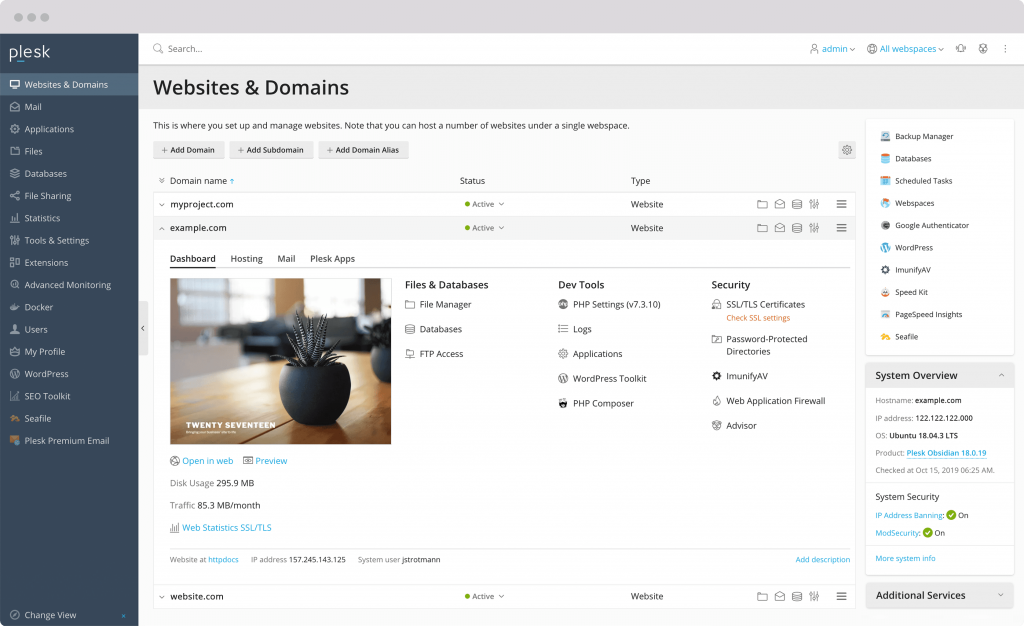

Complete Features to Meet WebOps needs
Kelebihan yang menjadi pilihan populer untuk mengelola web hosting
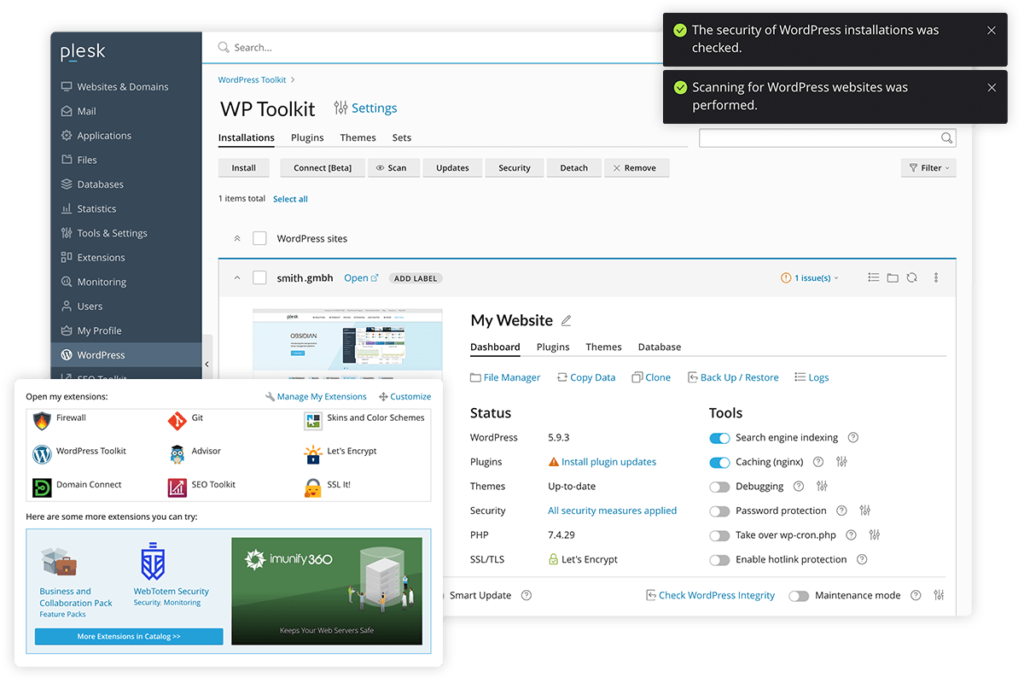

Extension
More than 100+ Extensions available in Plesk. Do more with your platform when you integrate tools such as DigiCert SSL, CloudLinux, Cloudflare, Sitejet Builder, NodeJs, PHP, NGINX, Let's Encrypt, Git, ImunifyAV, Backup, and many more.
Website Builder
Create a fast, responsive, and SEO-friendly website that users and search engines will love. Choose a template, customize it with the drag & drop editor, and hit ‘publish’ to go live.
Web Hosting Business
Set up easily and offer web hosting solutions to customers. Web-based control panel components offer simplicity for end users and flexibility for developers and content creators. Manage hosting services, websites, email, and all other services from a single control panel that is intuitive, attractive, and easy to use.

Level Layanan
Pertama, tentukan level layanan Manage Server yang sesuai dengan kebutuhan Anda. Kami menawarkan dua level layanan yang dapat disesuaikan dengan tingkat kebutuhan. Pilih level yang paling sesuai dengan kebutuhan dan rencana Anda.
Chat WhatsApp / Ticket
Setelah Anda memilih level layanan yang diinginkan, hubungi tim dukungan Focusnic melalui chat WhatsApp atau melalui Ticket bahwa Anda ingin membeli layanan Manage Server. Tim dukungan kami akan memberikan petunjuk lebih lanjut dan meminta informasi yang diperlukan terkait pesanan Anda.
Final
Selanjutnya, System Administrator Focusnic akan memproses permintaan Anda dan melakukan aktivasi layanan Manage Server sesuai dengan level yang Anda pilih. Kami akan melakukan brief singkat untuk mendengarkan kebutuhan Anda dalam menggunakan layanan yang akan dikelola oleh tim kami.
Manage Server Plesk
Enjoy the benefits of using Plesk Control Panel with full support from our team.
|
Scope of Work The following is the scope of Plesk server installation and management services that we will perform. Please note that each installation requires a license, and we can also perform additional installations upon request. |
|||||
|---|---|---|---|---|---|
| Instalasi & Konfigurasi | |||||
| Web Server | Apache, NGINX, LiteSpeed | ||||
| Programming Language | PHP, PHP Selector, Node.js, Ruby, .NET Toolkit | ||||
| Application | WordPress, Laravel, Joomla, Docker, Git, Sitejet Builder, dan 20+ apps lainnya | ||||
| Sistem Operasi | AlmaLinux, Rocky Linux, CloudLinux | ||||
| Cache | Memcached, Redis | ||||
| Antivirus & WAF | ModSecurity, Imunify360, KernelCare, cPGuard, Bitninja | ||||
| Backup Management | |||||
| Third-Party Integration | CSF Plugins, WHMCS, Softaculous | ||||
| DNS Cluster | |||||
| Hardening | |||||
| Server/Hosting Migration | 5 Website / 5 Domain | ||||
| Email Deliverability | SPF, DKIM, DMARC, rDNS/PTR, Relay Email | ||||
| Performance Tuning | |||||
| Monitoring | Uptime & Incident Report | ||||
| Custom Request | |||||
| Delivery | After the order is received or within a maximum of 1x24 hours | ||||
Control Panel dan Kemudahan yang Bisa Anda Dapatkan
Fitur lengkap untuk mengelola file, database, email, monitoring, dan masih banyak lagi

Mengelola Situs Web
Dengan menggunakan control panel, Anda dapat mengelola berbagai aspek situs web, termasuk mengelola file, email, database, dan pengaturan domain.

Anda dapat membuat akun email dengan domain Anda sendiri, memungkinkan Anda untuk mengelola email bisnis atau pribadi, mengatur pengaturan email, dan mengakses email melalui webmail.

Database
Manajemen database MySQL. Anda dapat membuat, mengedit, dan menghapus database, serta mengelola pengguna dan hak akses database.

DNS Manager
Fitur DNS Manager yang memungkinkan Anda untuk mengatur Domain Fowarder, DNS Record, dan pengaturan lainnya.

File Manager
Tampilan berbasis web untuk mengelola file di server. Anda dapat mengunggah, mengunduh, mengedit, dan menghapus file melalui File Manager.

Keamanan
Fitur keamanan seperti SSL/TLS Manager yang memungkinkan Anda menginstal dan mengelola sertifikat SSL untuk mengamankan situs web Anda. Anda juga dapat mengatur firewall, mengelola hak akses file, dan melindungi direktori dengan kata sandi.

Monitoring
Anda dapat melacak dan memantau penggunaan sumber daya situs web Anda dan mengidentifikasinya dengan mudah. Control panel menyediakan monitoring penggunaan resource seperti CPU, RAM, Storage, dan bandwidth.

Web Apps
Salah satu kemudahan menggunakan control panel yaitu tools untuk menginstal dan mengelola aplikasi web populer seperti WordPress, Joomla, Drupal, dan banyak lagi.

Backup dan Restore
Anda dapat mengatur jadwal backup, memulihkan data dari backup, atau mengembalikan situs web ke versi sebelumnya jika terjadi masalah.
Timeline Manage Server
Proses persiapan berikut dapat disesuaikan dengan kebutuhan dan kompleksitas pengelolaan
01 - Persiapan Awal
Customer melakukan persiapan awal, seperti menentukan kebutuhan server dan spesifikasi yang diperlukan. Kemudian, Anda dapat mengajukan dan melakukan konsultasi terkait server Anda dengan tim kami.
CUSTOMER FOCUSNIC02 - Cek Server & Lisensi
Kami akan melakukan pemeriksaan ketersediaan dan kondisi server sebelum melakukan deployment. Lalu, kami memverifikasi lisensi yang diperlukan untuk selanjutnya diinstalkan pada server Anda.
FOCUSNIC03 - Konfigurasi
Pada tahap ini kami akan melakukan konfigurasi server sesuai dengan Scope of Work, termasuk konfigurasi seperti hostname, IP address, sistem operasi, firewall, hardening, monitoring, plugin dan aplikasi tambahan jika ada.
FOCUSNIC04 - Dokumentasi
Selama proses instalasi, kami akan mencatat dan membuat dokumentasi terkait semua informasi penting tentang konfigurasi server, alamat IP, username, password, dan konfigurasi lainnya jika diperlukan.
FOCUSNIC05 - Ujicoba
Pada tahap akhir ini, kami akan melibatkan tim Focusnic dan Anda dalam diskusi dan pemantauan untuk memastikan bahwa proses migrasi atau implementasi server berjalan dengan lancar. Tujuan kami adalah memastikan bahwa semua layanan yang diinginkan telah dikonfigurasi dan berfungsi dengan benar. Kami akan terus berkomunikasi dengan Anda untuk memeriksa dan memastikan bahwa server beroperasi sesuai harapan Anda.
CUSTOMER FOCUSNIC06 - Final
Customer atau Anda sebagai pelanggan dapat melakukan pembayaran setelah proses instalasi dan konfigurasi server selesai dan dapat digunakan untuk production.
CUSTOMERFrequently Asked Questions and Technical Questions
See frequently asked questions
1. Reputation: The reputation of the email sender is very important. If the sender has a good reputation, the emails they send are more likely to reach the recipient's inbox.
2. Server Configuration: The sender's server configuration must be set up correctly, including DNS settings, SPF (Sender Policy Framework), DKIM (DomainKeys Identified Mail), and DMARC (Domain-based Message Authentication, Reporting, and Conformance).
3. Email Content: The content and structure of the email must comply with the guidelines and policies of the email service provider. Emails with relevant and high-quality content are more likely to reach the recipient's inbox.
1. SPF is a protocol that allows domain owners to specify which servers are authorized to send emails on behalf of that domain. With SPF, a DNS record is added to the domain configuration that identifies which servers have permission to send emails from that domain. When an email is sent, the recipient can verify the authenticity of the email by checking the SPF record to ensure that the sending server is legitimate.
2. DKIM is an email authentication method that uses asymmetric cryptography techniques to secure emails from forgery. In DKIM, the sender's domain signs the email using a private key known only to the sender. The recipient can verify the digital signature attached to the email using the public key available in the sender's domain DNS record. If the signature is valid, it indicates that the email has not been altered and originates from a verified domain.
3. DMARC (Domain-based Message Authentication, Reporting, and Conformance): DMARC is a policy framework that combines SPF and DKIM to improve email security. With DMARC, domain owners can define policies to control how emails that fail SPF or DKIM authentication should be handled. In addition, DMARC also provides reports that allow domain owners to track and analyze domain usage, including email spoofing attempts.